Oct 31, 2009
Oct 30, 2009
Mp3 Convert Master v1.1.1.333
Mp3 Convert Master v1.1.1.333 8.1 MB
MP3 Convert Master is an All-in-One MP3 converting tool that can convert WMA to MP3, Wav to Wma, Mp3 to Ogg, Mp3 to Wma, MP3 to WMA and other audio files between different formats. With MP3 Convert Master, you can rip CD to all popular audio formats such as MP3, MP2, WMA, WAV, OGG, MPC, and VOX... It is also an audio recorder which can record from any source available on your system and save the recorded audio directly to MP3, WMA, and WAV format.
MP3 Convert Master provides you with 3 functions
? Audio CD Grabber
? Audio Converter
? Audio Recorder
Key Features
? Powerful MP3 Converter. (MP3 to WMA, WMA to MP3, Mp3 to Ogg, Mp3 to Wma, OGG to MP3 and WAV to Mp3...)
? All-in-One MP3 converting tool with three functions (audio CD grabber, audio converter, audio recorder)
? Ripping all tracks marked with a check mark.
? Edit ID3 tag information
? Record from any source available on your system
? Save recorded audio directly to MP3, WMA, and WAV format.
? Convert audio files from one format to another
? Supports batch converting and ripping
? Excellent digital quality
Support Format
? Windows Media Audio Files (*.wma)
? Waveform Audio (PCM Wave) Files (*.wav)
? MPEG Audio (Various Layers) Files (*.mp3;*.mp2;*.mpeg)
? OGG Vorbis Audio Files (*.ogg)
? VOX Dialogic ACPCM Files (*.vox)
? G.72x Audio Files (*.g721;*.g723;*.g726)
? RAW Audio Files (*.raw; *.pcm).
? CD Audio Tracks (*.cda).
http://hotfile.com/dl/14822633/13247e9/Mp3_Convert_Master_v1.1.1.333.rar.html or
http://uploading.com/files/db5fbc5m/viet4a__Mp3_Convert_Master_v1.1.1.333.rar
Driver Genius Professional Edition 2009 v9.0.0.182 Full
Driver Genius Professional is a professional driver management tool features both driver management and hardware diagnostics. Driver Genius provides such practical functions as driver backup, restoration, update and removal for computer users. If you often reinstall your operating system, you may not forget such painful experiences of searching all around for all kinds of drivers. If unfortunately you have lost your driver CD, the search will be more troublesome and time-consuming. Now with the driver backup function of Driver Genius, you can backup all drivers in your computer before reinstalling, and restore them with the driver restoration function after system reinstallation has been completed. This will dramatically save your time for driver installation during the system installation procedure, and you will no longer worry about where to find a driver. Besides, you can create an automatic installation package for all drivers in your system by Driver Genius.
After you have reinstalled your operating system, you can restore all your drivers in just a click by this automatic restoration program. It's really convenient.
Driver Genius can automatically find driver for a device that the system can't find a driver for it. It can recognize the name and vendor's information of the device, and directly provide download URL for the required driver. Driver Genius also supports online updates for drivers of existing hardware devices. There are more than 30,000 most recent drivers for such hardware devices as motherboards, video cards, sound cards, network cards, modems, monitors, mice, keyboards, digital cameras, video capture cards, etc. on Driver Genius web site. Besides, there are daily updates for many drivers on our site. Our customers can obtain information for latest drivers by Driver Genius's LiveUpdate program, which can synchronize to the database on our site.
Backup, restore and update all your drivers in several mouse clicks. Get new driver for your computer now!
• Quickly backup device drivers for your computer.
• Just need one click to restore all drivers.
• Clone your drivers to an EXE auto-installer. Easy to install the drivers to many machines.
• Easy to get the most recent drivers for your computer. Keep your drivers up to date.
• Remove invalid drivers and useless drivers, improve system performance and stability.
• Device Diagnostics helps you locate a device that is not working properly or efficiently and offers an effective solution.
• Unlocks many hidden options in the NVIDIA display driver control panel. Including over clocking settings, AGP settings, Fan control, Stereo control, OpenGL 2.0 support, and more.
Operating System: Windows 98/98SE, Windows ME, Windows 2000, Windows XP/XP x64, Windows Server 2003/Server 2003 x64, Windows Vista/Vista x64, Windows 7/7 x64
Revision history
Driver Genius Professional Edition 2009 (Version:9.0.0.182) -- Oct 21, 2009
Bug fixes:
1. Fixed the program will break when scanning some storage devices.
2. Lost some drivers when backing up drivers.
3. The updated database can't be loaded immediately.
Improvement:
1. Improved Windows 7 compatibility.
2. Added Norwegian, Persian, Portuguese(Brazilian) language support.
Homepage - http://www.driver-soft.com/
Filesize: 7 MB
Upload-Date: 21.10.2009
Upload-Time: 22:35:08
Filename: Driver.Genius.Professional.Edition.v9.0.0.182-hardal.rar
Install note: When installation is finished Update to latest version.
RAPIDSHARE
MEGAUPLOAD
Microsoft Genuine Advantage - Updated XP,Vista ANd WIn 7 too
Microsoft Genuine Advantage - Updated Crack Released 5.3 MB
Works On XP,Vista ANd WIn 7 too !!!
1. "Menu Driven Installer" gives the freedom to install either WGA or OGA separately, depending on requirements. Thanks for all the sample scripts and codes and various other inputs from all my friends out there, hope you like this modification.
2. Included the "UNINSTALLER" ... yeah, I got a request for that too. So, basically, it will apply the original WGA back in (its ONLY FOR WGA, NOT OGA).
3. The logon message that used to reappear because of the latest WGA released by microsoft, and wouldn't go away... well, it has been fixed, permanently. So you can be assured that no more nag message at logon.
4. Updated, to work with the SP2 releases of Vista and Office 2007, and Internet Explorer 8 as well. Not just that, it should work on Windows 7 too.
5. It should now successfully work in normal mode itself, which means no need to boot up in safe mode to re-run crack.
http://hotfile.com/dl/15478314/12802fd/MS.Genuine.v3.rar.html
http://uploading.com/files/de37823c/MS.Genuine.v3.rar/
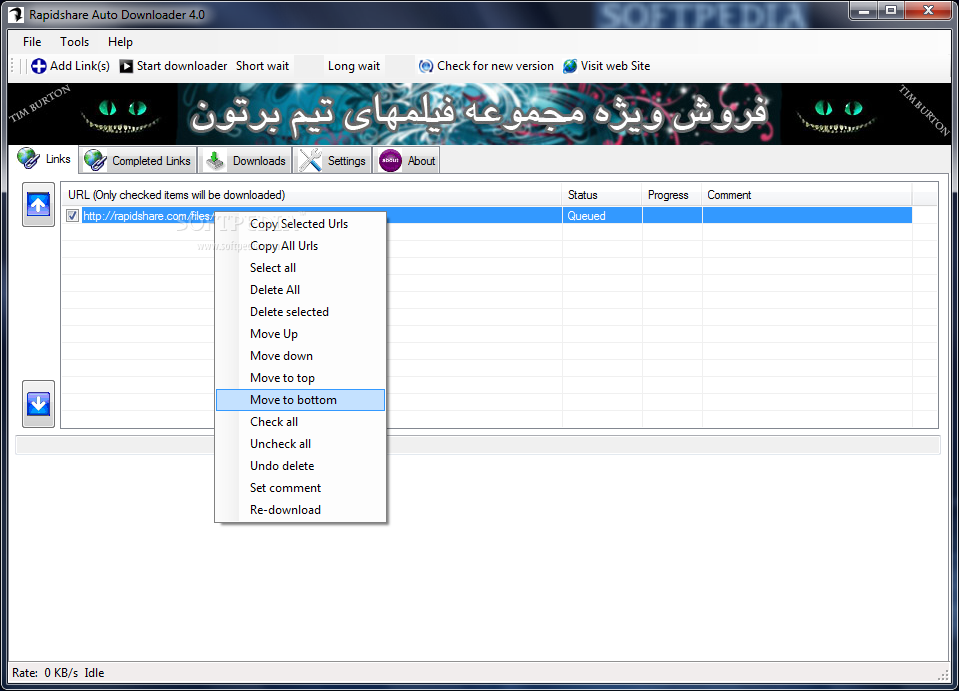
RAPIDSHARE AUTO DOWNLOADER
Tried of waiting for the download in rapidshare
may be this can help u
A software for automatic download of rapidshare.com links for free users
Rapidshare Auto Downloader is a handy automatic downloader for rapidshare.com users.
Here are some key features of "Rapidshare Auto Downloader":
· Download a group of links from rapidshare (one by one).
· Download incomplete downloads until all links are downloaded.
· Autoshutdown feature
· Load and save the download list.
· Check for new versions automatically.
· Support of 3 Languages : English , Farsi , French
Requirements:
· NET Framework
may be this can help u
A software for automatic download of rapidshare.com links for free users
Rapidshare Auto Downloader is a handy automatic downloader for rapidshare.com users.
Here are some key features of "Rapidshare Auto Downloader":
· Download a group of links from rapidshare (one by one).
· Download incomplete downloads until all links are downloaded.
· Autoshutdown feature
· Load and save the download list.
· Check for new versions automatically.
· Support of 3 Languages : English , Farsi , French
Requirements:
· NET Framework
Oct 17, 2009
Cool JavaScript Effect with Google Image Search
Try this … It's really coll
many people knew this but i am posting for the people who don't know this
1. Go to Google2. Click images
3. Type 'flowers' or any other word.
4. You will get a page which is having full of images
5. Then delete the URL from the address bar and paste the below script:
6.see the magic of programming
3. Type 'flowers' or any other word.
4. You will get a page which is having full of images
5. Then delete the URL from the address bar and paste the below script:
javascript:R=0; x1=.1; y1=.05; x2=.25; y2=.24; x3=1.6; y3=.24; x4=300; y4=200; x5=300; y5=200; DI= document.images; DIL=DI.length; function A(){for(i=0; i
6.see the magic of programming
How to Open-Eject-Close CD-DVD Tray Easily using your Mouse
I blogged about this topic as once one of my friend Rahul had a problem wherein the eject/close button of his CD/DVD drive stopped working so he had no option rather to push the cd tray every time to close it and for opening it , he used the eject option available on right click menu in Windows XP and Vista .
But , to close his CD/DVD tray he still had to use the physical push method, but you guys do not have to worry about same just download the following utility double click on the closetray.reg file , it will automatically add the close tray option to your right click menu of your DVD drive
You also need to download
nircmd.exe
from
http://www.nirsoft.net/utils/nircmd.html
and put into windows directory, for the above registry hack to work .
nircmd.exe
from
http://www.nirsoft.net/utils/nircmd.html
and put into windows directory, for the above registry hack to work .
Download – closetray.zip
Also you can try this Freeware software that does the same , but it opens in a separate window and you don’t get that ease of right click menu.
Read Deleted SMS Messages from any Nokia Symbian Mobile
So, you accidentally deleted the message that you enjoyed the most or was a message from special someone and now you are feeling sorry, well time to be alittle techie and get back your message, we cannot restore it back into your sms inbox but yes you can atleast see it and copy it down somewhere.
Requirements: Fexplorer Symbian Device file manager software which you can download from here, After downloading it transfer it to your mobile and install it.
Now follow these steps,
Open Fexplorer in your mobile.
Select drive C: or D: depending on the memory in which the Sms messages have been saved.
For example you selected c:, Then open "system" folder.
Then in "system" folder open "mail" folder.
Then in this folder you will see different folders (eg 0010001_s) and certain files (eg 00100000). These files are the actual messages. Browse through every folder and open all files till you get the sms you are looking for.
For opening the files don’t choose options>file>open as it will show format not supported rather choose options>file>hex/text viewer. By selecting the "Hex/ text viewer" you’ll be able to open and read the deleted SMS message.
Hope this helped you and saved you from the unnecessary trouble.
Requirements: Fexplorer Symbian Device file manager software which you can download from here, After downloading it transfer it to your mobile and install it.
Now follow these steps,
Open Fexplorer in your mobile.
Select drive C: or D: depending on the memory in which the Sms messages have been saved.
For example you selected c:, Then open "system" folder.
Then in "system" folder open "mail" folder.
Then in this folder you will see different folders (eg 0010001_s) and certain files (eg 00100000). These files are the actual messages. Browse through every folder and open all files till you get the sms you are looking for.
For opening the files don’t choose options>file>open as it will show format not supported rather choose options>file>hex/text viewer. By selecting the "Hex/ text viewer" you’ll be able to open and read the deleted SMS message.
Hope this helped you and saved you from the unnecessary trouble.
Skipping Boring Navigation Messages to Talk Directly to Customer Care on a IVR
Whenever we dial some customer care or enquiry number we are greeted with long and boring series of navigational commands “Press1 to do this, 2 to do that and more. .. “ , now if you are a regular caller that hurts but with some clever use of DTMF tones signals knowledge we can trick the IVRs machine and can quickly navigate to wherever we wish inside a menu .
Suppose You have to dial 131 for train enquiry which asks you further to press 2,3,1 to reach to the specific menu, then to automate this sequence 131 –> 2>3>1 we can use the (*) key on the mobile phone keypad to generate ‘p’ symbols (On Nokia sets repeatedly press * to get a ‘p’ symbol , while on Sony Ericsson keep the * key pressed to get a ‘p’ )
So now, just dial 131p2p3p1 for the above sequence of dialling 131 and then entering 2>3>1 to reach the menu without listening to all that gibberish .
Hope this makes you tech life easier and faster .
How to Listen/View Audio or Video File While Still Downloading It – Works for Torrents Too
Downloading MP3 or Video files is what most of us do on the internet, but it feels real bad when the audio or video file we downloaded for about an hour turns out to be bad, skippy or something else . Now that would sure make you hit your head hard on the wall, but wait here is a savior , You can use the Following methods to Listen to a Mp3 file while it is still downloading and view a video in a similar fashion. Please note that there are several players that support such incomplete files but the ones i would recommend are VLC and Winamp
- If you are Using Opera, it’s really simple just start the download file as usual and from your Transfers tab, right click on file and Open With and choose VLC or Winamp
- Firefox users have to go a step further, start the download and then right click on the file in downloads tab and click “open containing folder” and then there you will see a additional .part file of the same name as the one you are downloading , Just drag and drop it on VLC or Winamp .
- Directly using VLC ( Just copy the audio , video Download link ) and open up VLC and go to Media->Open Network and paste the link in the address field and press the play button at bottom it will begin playing .
- For torrents , just do this directly go to the folder where your file is being saved and drag and drop the file to VLC ( for a longer and better playback try to go to your torrent client settings and enable the option to download initial parts of the file first or give them preference at least )
- IE and others go same way as Opera .
You can view the mp3 or video file this way and if you dont like the preview , just cancel the download
Hope this solved your Multimedia Downloading woes .
View your PDF Document Without any PDF Reader Software – Convert it to Exe
Have you ever got into a situation where you wish to send a file to your friend who does not have a PDF reader installed, or is really lame to install one and you still wish to give him a document as a PDF file , saving him from hassles of installing a PDF reader software to view the file, then here is a solution for you. Try the PDF2EXE software which converts any PDF to an Exe file ( Alas! it will only work in windows ) but this approach has several advantages too like,
Compress, encrypt PDF document
Set password for the converted EXE file
Disable conversion from PDF to TXT, EXE to TXT
Disable printing of PDF file
Launch slide show after initialization
Disable conversion from EXE to image formats
Disable document properties
Prevent generated EXE from modification
You can download this wonderful tool from here . Yes it’s a 15 day trial but I believe if you find it useful you can buy it or just use the trial and later forget it .
USB Pen Drive Data Copy in Stealth without the Owner Knowing Used for Stealing Data
USB hidden copier is a small utility for windows requiring .net framework that does a simple but much wanted job of copying any inserted pen drive secretly to a predefined folder upto 8GB and It does this without anyone knowing it happened except you.
Features of USB Hidden Copier :
- It is totally invisible and masked enough in order not to be detected easily.
- It will copy only a maximum of 8GB data.
- Content is saved under the folder named as the
USB Drive name. - It starts at computer startup.
- First copy is made 3 minutes after computer starts and then every 10 minutes the content will be overwritten, so you will have always latest content of that USB.
- Copied Content is saved in the default directory: “C:\WINDOWS\sysbackup\”. You can specify the folder of your choice if you want to. Click the “Browse” button in the control panel.
- The copier program is called “systemidle.exe” in order to mask it.
- In order not to copy you own USB Drive you can create a file named “friendflag.winxp” and put it directly on your USB (this file can be also with hidden and system attributes so you will not delete it accidentally). So when the program finds this file it will not copy the drive when it is located (your USB).
How it works :
Step 1 : Install USB Hidden Copier.
Step 2 : Select the folder where you want to copy the content.
Step 3: You can start copying immediately by pressing Alt+C. If program is not actually copying, it will start copying immediately and the program’s icon (tray icon) will appear in notification area for 1/2 sec and will hide again. This way you will be notified that the command is accepted.
Step 4: To close program (Exit) you can press Alt+E. If program is not actually copying, it will close (exit) and you will be notified for this by a triangle icon in notification area, showing/hidding for 1/2 sec.
You can download this wonderful app here . credit goes to the developer of this app “ Altin Infomaster”
Partially Downloaded or Corrupt Zip File Repairing Software Utility Tool – Download
So, you just downloaded a ZIP file from the Internet and got stuck while opening it with a message such as “Invalid Zip file” or “Corrupt Zip file” and it asks you to redownload it, now for small files it’s ok but for huge files you wont consider doing that again honestly, neither would I .
Now we have two scenario’s
1. All Zip file contents are important for you , ie. each and every file in the ZIP , then you have no solution except than redownloading the whole zip file again.
2. If you are interested in only some of the files inside the ZIP archive and not all of them, then you can use this software utility to get those files .
So, for the second scenario we have a freeware utility Disk Internals Zip recovery tool, which can be downloaded here.
This tool would work in most cases and i hope it would prove useful for you too
Connect and Access Internet from Any BSNL Landline
For all the Internetoholics out there, who want Internet everywhere they go , but don’t want to carry a Data card or USB modem here is a small trick that will get you a Dial up Internet connection ( around 56Kbps ) anywhere you can find a BSNL landline. Yes, I too knew about this since long, but never thought of writing about it . BSNL provides a no registration required service named netone which can be accessed from any BSNL Landline , so if you visit some place and find a landline and your PC or Laptop has a modem port then you are lucky , follow these steps and get Internet access quick .1. Connect the phone wire to your PC/ Laptop
2. Create a new Network connection by any name ( under Network connections Control panel )
3. Enter
Username = netone
Password = netone
Number to Dial = 172222
4. Now just press dial and hopefully you will be connected and you can surf Internet , the rates are
15 Rs. per hour during Daytime and 7.5 Rs. during 11Am to 7Am Night time
This is the actual cost you will be charged, nothing extra and it would be there in your BSNL bill at the end of the month .
Have fun with this trick and keep it as it will definitely save your face many times, when you need internet connection badly and nothing’s around ( although mobile GPRS is doing the trick for most of techies like me )
Oct 7, 2009
Cambridge Grammar of English Full
Cambridge Grammar of English Incl. CD
Cambridge Grammar of English is a 'must-have' for any serious learner or user of the English language. Using ground-breaking language research, it offers clear explanations of spoken and written English based on real everyday usage. A clear two-part structure makes the book particularly user-friendly. In the first section, 'From word to grammar: an A-Z', A-Z entries give special attention to the vocabulary-related grammar often neglected in other grammar reference books. The second section is organised into topic chapters covering the more traditional grammatical categories such as tense, sentence structure and parts of speech.
http://hotfile.com/dl/8452769/4eb666c/CGE.part1.rar.html
http://hotfile.com/dl/8452772/42a8978/CGE.part2.rar.html
http://hotfile.com/dl/8452776/395c65e/CGE.part3.rar.html
http://hotfile.com/dl/8452779/d702c70/CGE.part4.rar.html
OR
http://letitbit.net/download/2588.21be7b4b6e10062fc5b3a22778/CGE.part1.rar.html
http://letitbit.net/download/2394.27bd22755234a5596ded71d0f3/CGE.part2.rar.html
http://letitbit.net/download/6346.61dbcdd3b3edd8a3be4e75c9c6/CGE.part3.rar.html
http://letitbit.net/download/6619.6246aa2ba80184c08842a1c6a8/CGE.part4.rar.html
Oct 2, 2009
Speaking Notepad 6.0 - Your Computer will speak what U write
Speaking Notepad is handy text editor with powerful text-to-speech capabilities. Speaking Notepad will read your TXT, RTF, DOC, HTML and PDF documents with SAPI4 and SAPI5-compliant high quality voices, different speed and pitches, read clipboard content, record texts into WAV, MP3 and WMA files and even read every word or sentence you are typing.
Overview:
Speaking Notepad is handy text editor with powerful text-to-speech capabilities. Speaking Notepad will your TXT, RTF, DOC, HTML and PDF documents, readme's, notes, e-mails and clever and interesting thoughts aloud. With its help you'll cope quickly with routine work at home or in the office. Just imagine, how much easier it is to listen to texts instead of reading them! Give a rest to your eyes! The program will read texts with SAPI4 and SAPI5-compliant high quality voices, different speed and pitches, read clipboard content, record texts into WAV, MP3 or WMA files and even read every word or sentence you are typing. That means you can control your typing aurally without looking fixedly at your monitor. Speaking Notepad is designed for those who value swift commodity in work combined with fascinating abilities and an interface which will delight your eyes. It will definitely become your best friend.
Main features:
- Handy notepad with speaking capabilities
- Supporting DOC, RTF, HTML, PDF and text files
- Recording speech into WAV, MP3 or WMA sound files
- Choose one of dozens of different voices
- Change voice speed and pitch in one click
- Powerful bookmark system
- Type & Read function
- SAPI4 and SAPI5-compliant voices
- Large number of visual styles
- Smart Spell Checker
- Efficient work with hot keys
- User-friendliness and handy interface
rapidshare
Subscribe to:
Posts (Atom)
_27fa94001ea37404efebbffd0633dc62.jpg)